What is DeepSeek Harness dsh?
DeepSeek Harness is DeepSeek’s open-source agent runtime (MIT, CLI dsh). The product page treats models, tools, skills, sessions, sandbox, storage, the loop, and the UI as replaceable plugins on Cordis. Slogan: Everything is a plugin. (deepseek.com/harness)
If you searched “what is DeepSeek Harness,” split three products—not another pass at function calling. The API is the engine; dsh is a runtime that already has a wheel, a toolbox, and driving logic. A homemade while loop against chat/completions is the August DeepSeek Harness AI Agent guide. This article only accepts the official launcher: install, Web UI, first coding task.
| Option | What it owns | Who it is for |
|---|---|---|
| DeepSeek API | Models and tool calling | People building their own agent |
| dsh | Runtime, tools, sessions, permissions, UI | People who want the official agent as-is |
| Homemade agent | Your own loop | People who need full control of the architecture |
The site also lists run modes. For the first hour, Standard Web UI is enough: a full coding agent that can edit files, run a shell, and search. Code mode sits on Standard and lets the model orchestrate multi-step tool calls in TypeScript—turn it on after 3080 is stable. Minimal keeps little more than bash and an editor; useful for model comparisons, not a daily IDE. Creator is for inspecting the runtime and trying plugins. Skip it in the first hour.
What do you need before installing dsh?
The official README’s zero-install path is two lines: install Node.js, then run npx @deepseek-ai/dsh web. Community notes mention Node ^22.19.0 or >=24.0.0. Trust whether your local npx can pull @deepseek-ai/dsh. Do not downgrade system Node just to match a blog post.
The official CLI resolves the key in this order: process environment → ~/.dsh/.credentials.yaml → .env in the current directory → ~/.dsh/.env. Pick one for the first run. Do not write four copies that disagree:
export DEEPSEEK_API_KEY=sk-your-key
mkdir -p ~/.dsh
printf 'DEEPSEEK_API_KEY=sk-your-key\n' >> ~/.dsh/.env
chmod 600 ~/.dsh/.env
The official adapter name is deepseek-official. It uses DeepSeek’s model routing by default. Pointing traffic at a self-hosted gateway is step two. Read the OmniRoute write-up first if you even need one. Do not change the Base URL in the first hour.
The CLI treats the directory you run the command from as the default workspace. Create an empty repo or a copy first, for example ~/work/dsh-first-run. SAFETY.md asks for least privilege and prefers a disposable VM, container, or dedicated machine. If the key and isolated directory are not ready, do not run npx yet. A UI that opens while you cannot control the task is worse than a failed install.
- Use a dedicated workspace—not
$HOMEor a production repo - Keep the first task read-only; leave default permissions; do not enable
danger-full-access - Put the key in an environment variable or
~/.dsh/.env; keep~/.dsh/sessions/so you can replay calls
How do you install DeepSeek Harness and open the Web UI?
You do not need to clone on the first run. Enter the isolated directory:
cd ~/work/dsh-first-run
npx @deepseek-ai/dsh web
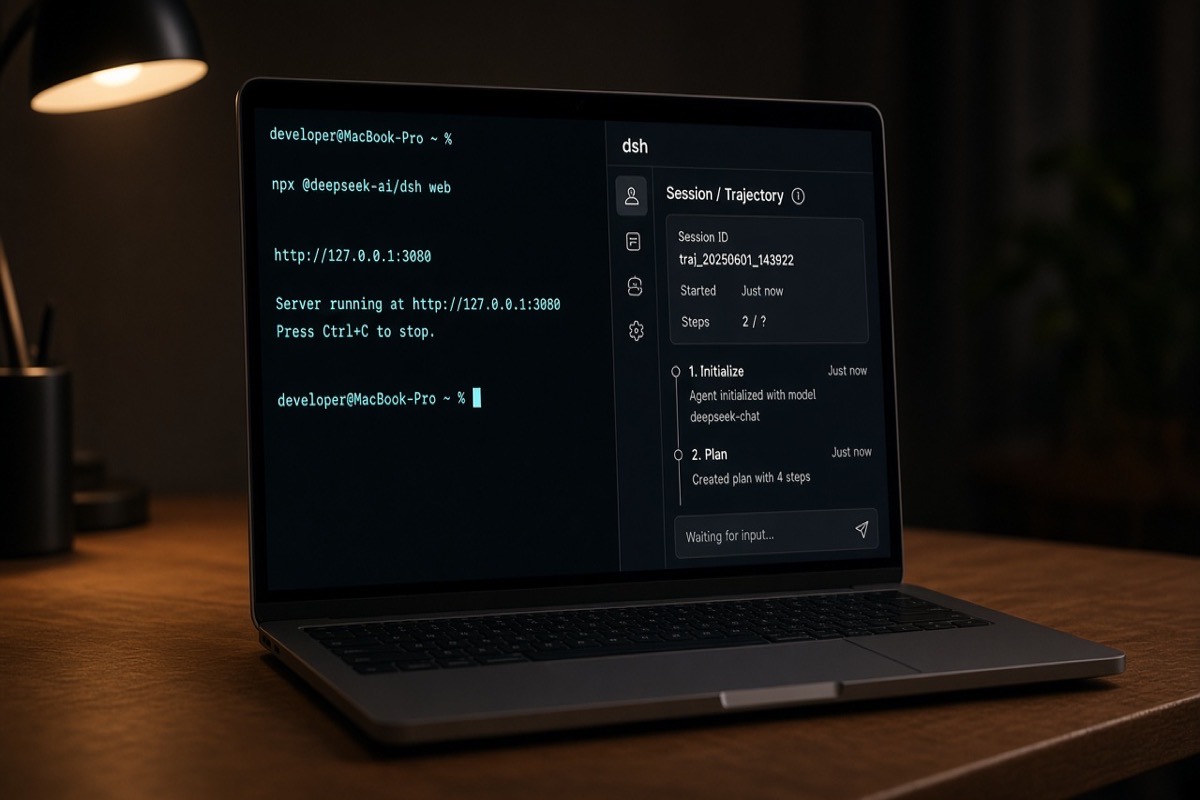
That is the official README install entry. dsh web is an alias for --profile web. The first run initializes ~/.dsh/profiles/web/ from a template. The workbench defaults to http://127.0.0.1:3080 and, on a local start, opens the default browser. Over SSH it only prints the host URL; local forwarding is left to the SSH client or editor. Preview commands change. Recheck the day’s README and CLI notes on deepseek-ai/deepseek-harness.
npx @deepseek-ai/dsh web --no-open
npx @deepseek-ai/dsh web --port 8080
By default it binds loopback only. If you need the UI from another machine, use SSH local forwarding. Do not expose the UI on the LAN on day one. The official user guide says the workspace is chosen in the Web UI directory picker, not a CLI flag. After 3080 opens, confirm the current directory is the isolated repo before you send a task.
Config lands in ~/.dsh/: let it create the home directory; use sessions/ to replay tool calls; keep only the key in .env at mode 600; do not hand-edit patches in profiles/web/ on day one.
Clone the source only in three cases: you need a specific commit, you are changing a plugin, or npx failed and you need the build output. Then git clone the official repo, run pnpm install, pnpm run build, and pnpm dsh web. pnpm dsh web uses the build; it does not compile again. Follow AGENTS.md in the source tree. Do not paste demo commands into production scripts.
How do you use dsh headless?
dsh run is gone. One-shot tasks use headless: it opens a new session, prints the last non-empty assistant text to stdout, and exits.
cd ~/work/dsh-first-run
npx @deepseek-ai/dsh --profile headless "List the filenames in the current directory. Do not modify any files."
That is the first result worth writing down: process exit code, whether stdout has a final reply, and whether ~/.dsh/sessions/ gained a replayable log. The task must stay read-only. Official profiles also include sdk, sdk-minimal, and acp for other processes over JSON-RPC or ACP. That is week-two work. Do not open those in the first hour.
How do you use DeepSeek Harness for AI coding?
A talking Web UI or headless reply is not the same as “let it edit the repo.” Official Standard mode can edit files, run a shell, search, and spawn sub-agents. Preview software plus a model that writes commands means the first coding task must be checkable with git diff. This is not a benchmark. It asks whether dsh edits the right function in the directory you named.
Start with a tiny repo you can judge by eye: greet.ts deliberately returns hi Ada; the test expects Hello, Ada. You can see pass or fail without trusting a fluent explanation.
mkdir -p ~/work/dsh-first-run && cd ~/work/dsh-first-run
git init
printf '%s\n' 'export function greet(name: string): string {' '  return "hi " + name' '}' > greet.ts
printf '%s\n' 'import { greet } from "./greet.ts"' 'if (greet("Ada") !== "Hello, Ada") {' '  throw new Error("unexpected greeting")' '}' > greet.test.ts
git add . && git commit -m "chore: isolated dsh first-run repo"
- Read-only:
Read greet.ts and greet.test.ts. Explain why the test fails. Do not modify any files.Pass: it points out the return value does not match the test, andgit statusstays clean. - Single file:
Change only greet.ts so greet("Ada") returns Hello, Ada. Do not change the test. Do not commit.Run the test yourself—or inspect the return value if you have no runner—then rungit diff. Pass: the diff touches onlygreet.ts, and the return value matches the test. - If the test still fails, paste the failure back and let it edit the same file again. You must read the diff before any commit. When a coding task fails, open
~/.dsh/sessions/or the official Trajectory view and separate “wrong tool,” “bad arguments,” “you denied approval,” and “this is not even the workspace.”
Stay on default Standard / native tools the first time. After a single-file task is stable, consider DSH_TOOLS_MODE=code or both so the model can orchestrate multi-step calls in TypeScript. Official notes say the process-level fallback for DSH_PERMISSION_MODE is close to workspace-write. danger-full-access almost never asks for approval; the first-run list already rules it out. If you stall on JSON tool arguments, read JSON Schema and AI agents before you switch models. If tasks are too large and edits bounce, see the AI coding workflow—dsh only answers whether the official runtime is present.
Did the DeepSeek Harness install succeed?
“Hands-on” in the title is not a leaderboard. It is a thirty-minute list. All five items must pass before you say “dsh works on this machine.” If one fails, go back to that step. Do not widen file edits yet.
| Check | Pass | If it fails |
|---|---|---|
| Process | npx @deepseek-ai/dsh web stays in the foreground |
Check Node, the npx cache, and the port |
| UI | 127.0.0.1:3080 opens |
Use --no-open and visit by hand; confirm --port |
| Key | No missing official-provider credential error | Keep one valid DEEPSEEK_API_KEY |
| Read-only task | Headless prints a reply and exits with no new diff | Narrow the task |
| Trace | ~/.dsh/sessions/ can replay this call |
Check DSH_HOME |
If any of the five is missing, do not jump to “auto-edit dozens of files.” Preview builds move fast. Write down the command, Node version, dsh package version, and the date. Next week you will know whether your environment changed or upstream shipped a breaking change.
Common dsh errors and how to fix them
npx fails or crawls. The first run has to pull @deepseek-ai/dsh. If the network is flaky, build from source or confirm the npm registry. A half-written cache directory is not “already installed.”
3080 will not open. Add --no-open and visit by hand. Check whether the port is taken, or whether you passed --port and still opened 3080.
The UI opens but the model does nothing. Usually the key layer does not match. Process environment wins; ~/.dsh/.env is only a fallback. Restart the web process after you change it. Do not expect a hot-reloaded key.
It edited the wrong directory. Look at the current directory at launch and the repo selected in the Web UI. The most common mistake is treating the home directory as the workspace.
You are still using dsh run, or headless never exits. The official user guide says that subcommand is gone. One-shot tasks use --profile headless. Shrink the task to one read-only sentence, confirm the process is not waiting for approval, then see which step the session log stuck on.
dsh is not a skin for Claude Code or Codex (DeepSeek vs Anthropic vs OpenAI). It is a standalone runtime plus Web / headless; config lives in ~/.dsh and does not share keys, permissions, or sessions. First check: 3080 or one headless task. Smoke-test the others on their own CLIs. A shared gateway is week-two work.
Do not treat it as production. README says developer preview and breaking changes. SAFETY.md is harder: no security audit; it can run model-generated commands, load third-party plugins, and touch the network plus files you hand it. Sandbox and approvals lower risk; they are not the only control. Fine for isolated install checks, one-function AI coding, and session-log experiments. Not fine on a production repo with high privileges, unattended monorepo rewrites, or a preview written into an external SLA.
FAQ
What is dsh?
dsh is the CLI for DeepSeek Harness, DeepSeek’s open-source agent runtime. It handles sessions, tools, permissions, and the Web UI. It is not the Chat API.
How do you install dsh?
Install Node.js, then run npx @deepseek-ai/dsh web in an isolated directory. Clone and pnpm run build only when you need to change a plugin, follow a commit, or inspect the build.
Does dsh need an API key?
Yes. The UI can open without a key, but coding tasks will not run. Put DEEPSEEK_API_KEY in the process environment, or write it to ~/.dsh/.env and chmod 600.
Does dsh support a Web UI?
Yes. npx @deepseek-ai/dsh web opens the workbench at http://127.0.0.1:3080 by default. Add --no-open to skip the browser, or --port if 3080 is taken.
Can dsh do AI coding?
It can edit files, run a shell, and search, but as of September 2026 it is still a developer preview. First run should stay in an isolated repo: read-only analysis, one-function edit, tests, then git diff.
How is dsh different from Claude Code?
dsh is DeepSeek’s own runtime. Config lives in ~/.dsh and does not share keys or sessions with Claude Code or Codex. You can install them side by side; get dsh working on its own first.
For longer dsh runs, keep the test environment separate
dsh touches the workspace, API keys, sessions, and command execution. Close the laptop lid and 3080 plus headless sessions stop. Parking a preview agent in a directory you can snapshot and revoke is easier to reset than living in your home folder.
After local read-only tasks and a one-function diff pass, if you still need a 24/7 isolated macOS box, look at a cloud node then. That is closer to a repeatable experiment than handing a production repo to preview software on day one. View ZekVPS cloud Mac mini plans