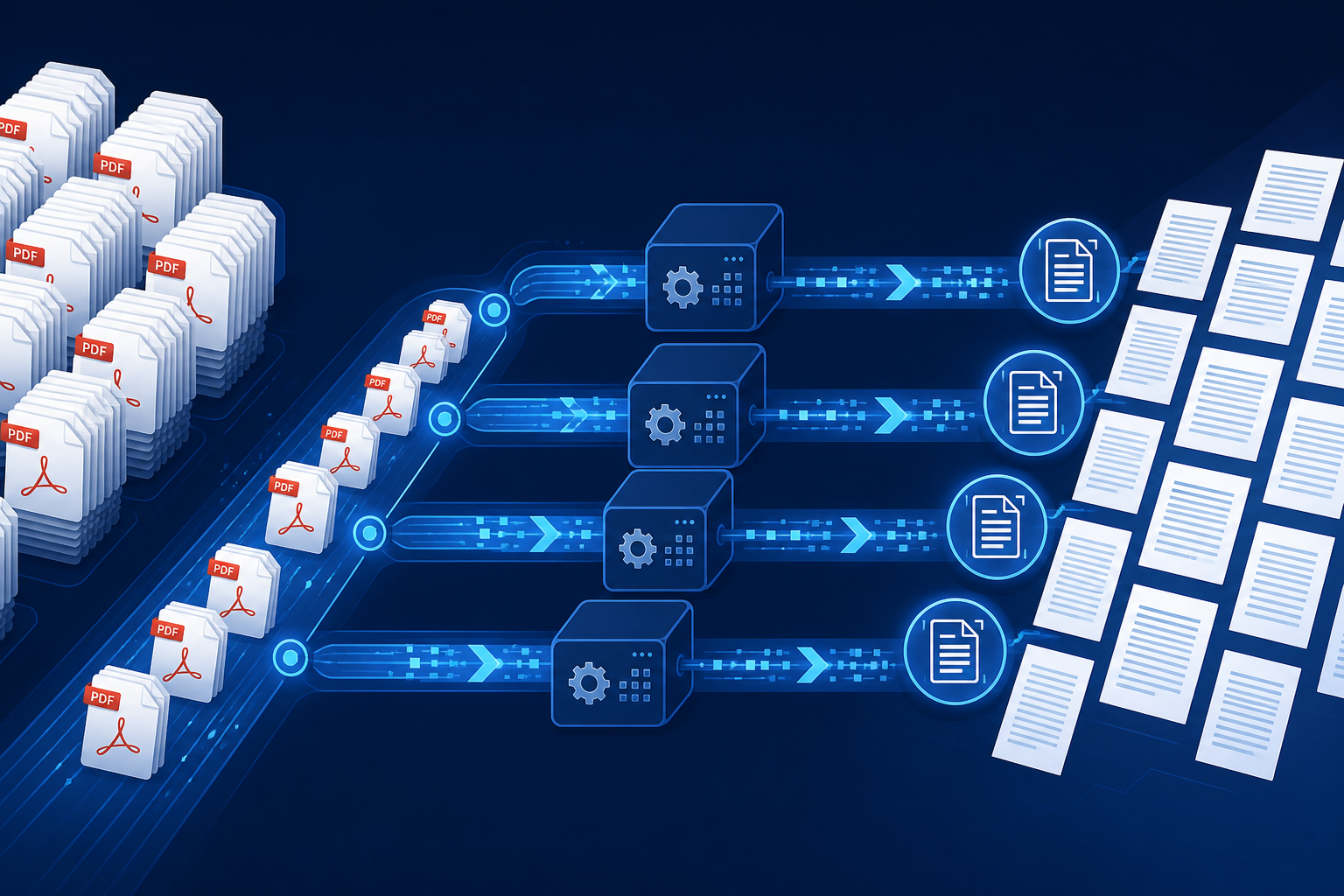
Hybrid routing / parallel workers / SQLite cache / 30k-file script
Archive migration, contract audits, invoice filing — when you face tens of thousands of PDFs, the instinct is to install OCR software and click "batch." That works for hundreds of files; at 10k+ scale the bottleneck shifts from accuracy to disk I/O, redundant work, and no resume capability. This article describes a 2026-ready pipeline: detect text layers first, OCR only when needed, with multiprocessing and incremental cache to finish 30k documents overnight.
The headline takeaway: the fastest method is not the strongest OCR — it is avoiding OCR whenever possible. Native-text PDFs extract in milliseconds with PyMuPDF (50–200× faster than OCR). The old approach of OCR everything should become type-based routing.
Почему полный OCR не работает на десятках тысяч файлов
A 20-page scan takes 30–90 seconds to OCR. At 30k files with 8 cores, full OCR needs days to weeks. Yet 40–70% of batches are exported PDFs with intact text layers — page.get_text() finishes in milliseconds.
Classify before you recognize
Classification signals
Decision logic
- Text layer — any page with
get_text()> 50 chars →text_native - Scan signature — image-only pages →
needs_ocr - Encrypted / corrupt — log to
errorqueue, don't block the pipeline
Design principle: split recognition into classify → extract → OCR fallback; each stage scales and resumes independently.
Три пути: извлечение, OCR, гибрид
| Route | Use case | Speed | Accuracy |
|---|---|---|---|
| PyMuPDF extract | PDFs with text layers | 0.01–0.5 s | 100% |
| pdftotext / pdfplumber | Simple layout | 0.1–2 s | High |
| Tesseract / PaddleOCR | Scanned PDFs | 30–120 s | 85–98% |
- Extract
- Reads embedded font streams — default for bulk jobs.
- OCR
- Renders pages to bitmaps; CPU/GPU heavy — only for
needs_ocr. - Hybrid
- Walker → Classifier → Extract pool + OCR pool in parallel.
Самая быстрая архитектура: метаданные + параллельные воркеры
- Walker —
os.scandircollects paths without opening PDFs - Classifier — multiprocess first-page probe, writes
file_type - Extract pool — handles
text_native→ JSONL / SQLite - OCR pool — consumes
needs_ocronly; monitor load with Cmd + Activity Monitor
Сравнение инструментов
| Tool | Lang | 10k+ bulk | Notes |
|---|---|---|---|
| PyMuPDF | Python | ⭐⭐⭐⭐⭐ | Fastest |
| pdfplumber | Python | ⭐⭐⭐⭐ | Tables |
| pdftotext | CLI | ⭐⭐⭐⭐ | Shell friendly |
| Tesseract | CLI | ⭐⭐⭐ | Multilingual |
| PaddleOCR | Python | ⭐⭐⭐⭐ | Strong CJK |
| Adobe API | REST | ⭐⭐ | Per-page billing |
Продакшен-скрипт: 30 000 файлов за ночь
#!/usr/bin/env python3
import sqlite3, fitz
from pathlib import Path
from multiprocessing import Pool, cpu_count

DB = "pdf_index.sqlite3"
ROOT = Path("/data/invoices")

def classify(path: str) -> tuple:
    try:
        doc = fitz.open(path)
        sample = "".join(doc[i].get_text() for i in range(min(3, len(doc))))
        kind = "text_native" if len(sample.strip()) > 50 else "needs_ocr"
        doc.close()
        return (path, kind, "classified")
    except Exception as e:
        return (path, "error", str(e))

if __name__ == "__main__":
    files = [str(p) for p in ROOT.rglob("*.pdf")]
    with Pool(cpu_count()) as pool:
        for row in pool.imap_unordered(classify, files, chunksize=64):
            pass  # write to SQLite; OCR workers consume needs_ocr
On Apple Silicon, chunksize=64 saturates I/O better than default. Classification of 30k small PDFs on SSD: 20–40 minutes; extract adds 1–2 hours; OCR queue runs at pool capacity.
Настройка производительности
- MD5 incremental cache — skip unchanged files on reruns
- Avoid NFS for OCR — sync batch to local NVMe first
- Cap render DPI — 200–300 DPI is enough; 600 DPI is 4× slower
- Language packs —
chi_simfor Chinese,engfor English; mixing hurts accuracy
Why is PyMuPDF faster than pdfplumber?
PyMuPDF wraps MuPDF in C — near-zero Python overhead. pdfplumber (pdfminer.six) is 3–10× slower but better for table coordinates. For full-text search at scale, PyMuPDF wins.
FAQ
- Stamps? — Text extract won't catch them; need OCR + detection models
- Encrypted PDFs? — Decrypt first or log as
skipped - GPU required? — No for extract; PaddleOCR ~3–5× faster on GPU
- Full-text search? — JSONL → Elasticsearch, or SQLite FTS5 for mid scale
Итог: hybrid routing + parallelism + incremental cache beats any single OCR tool for 10k+ PDFs.
Запускайте пакетный OCR на облачном Mac со снимками
Выделенный узел M4, аренда по дням, SSH из коробки
Сингапур · Япония · Корея · Гонконг · США
Пакетная обработка PDF насыщает CPU и I/O — вынесите пайплайн на отдельный облачный Mac. Смотреть тарифы ZekVPS Mac mini — Снимки + параллельные воркеры для спокойной массовой обработки.