Cloud Mac Bare-Metal Workstation | Mac mini Hosting
Dedicated full Apple M4 physical machine, not a shared VM. Ideal for Mac VPS, virtual desktop (VDI), Xcode builds and CI/CD remote development — SSH / VNC ready immediately.
- Bare-metal dedicated — full Mac mini, not a time-shared VM
- Full macOS — native Xcode, Homebrew, Docker
- Dedicated network — public IPv4 · 1 Gbps bandwidth
- Flexible billing — daily / weekly / monthly / quarterly, order without signing in
ZekVPS Cloud Mac Service Types
Mac Hosting
Entire Mac mini hosted in the datacenter, running 24/7, ideal for long-term builds and macOS server workloads.
Mac VPS · macOS VPS
Dedicated macOS cloud server with full root access, rent by the day. More stable than shared VMs, ideal for multi-project isolated deployments.
Virtual Desktop Mac · VDI
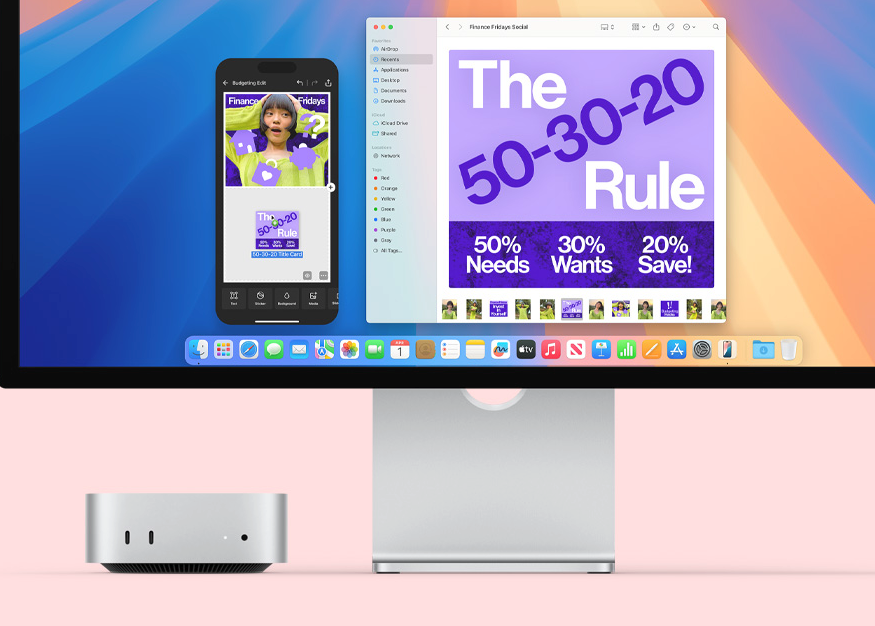
Remotely access a graphical macOS desktop via VNC — view simulators and UI, reduce latency for cross-border team collaboration.
Mac mini Cloud
Apple M4 bare-metal Cloud Mac, supporting Xcode, iOS Simulator, Flutter and the full CI/CD toolchain.
Renting a Cloud Mac — what workloads does it cover?
Whether you're an iOS developer, a cross-border team, or an AI engineer, you can run native toolchains in a full macOS environment.
Xcode & iOS CI/CD
Compile, sign, and run the simulator on a Cloud Mac. Write code on Windows/Linux locally, offload heavy builds to the remote M4. Perfect as a GitHub Actions alternative and for multi-branch pipelines.
Mac Virtual Desktop · Remote Collaboration
Access Mac VDI graphical desktop via VNC — feels closer to local for cross-border teams. Dedicated IPv4 and nearby nodes (Singapore, Japan, South Korea, Hong Kong, US East) reduce latency.
AI Inference & macOS Experiments
Offload model inference and training orchestration to a remote M4, keep only debugging local. Full sudo access to install Core ML, Python, and any native macOS dependency.
Mac mini Hosting: compact form factor, datacenter-grade operation
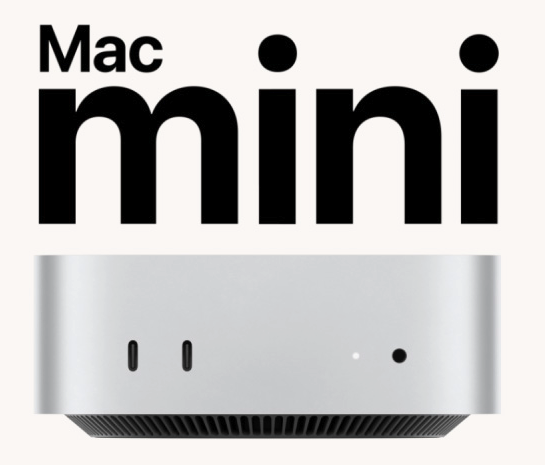
Approximately 12.7 cm square Apple M4 device with professional cooling and power. ZekVPS delivers the entire physical machine to the datacenter — not a virtualized time-sharing solution.
Form Factor
~12.7 cm square, rack-friendly
Apple M4 Bare-Metal
Full Mac mini dedicated, not a shared VM
Rich I/O
USB-C · Thunderbolt · Ethernet · HDMI
Datacenter Delivery
Professional cooling & power · 24/7 uptime
- USB-C
- Thunderbolt
- Gigabit Ethernet
- HDMI
Four steps to your Cloud Mac
Fully trackable from selection to remote connection. You can place an order without signing in.
-
Choose your Mac VPS configuration
Memory, storage, datacenter, and billing cycle — live pricing on the pricing page.
-
Complete payment
One-time for daily/weekly; monthly/quarterly subscriptions auto-renew and merge into your account.
-
Ticket-based delivery
Enters the provisioning queue; progress and power operations tracked via support tickets.
-
SSH / VNC connection
Get credentials from the dashboard and start Xcode builds or remote desktop collaboration immediately.
Local
Write code · Git push · Daily tasks
SSH
VNC
Cloud Mac M4
Xcode Build · iOS Simulator · CI/CD
Cloud Mac Rental vs. Buy Your Own vs. Shared VMs
The three options most commonly compared when searching "rent a Mac" or "Mac hosting".
| Criteria | Buy your own Mac mini | ZekVPS · Bare-Metal Cloud Mac | Shared VM |
|---|---|---|---|
| Upfront cost | ~$799+ one-time | From $95.1/month, daily trial available | Low monthly fee |
| macOS environment | Full | Full macOS + admin access | Restricted / incomplete |
| Compute isolation | Local dedicated | Full Mac mini dedicated | Shared with others |
| Xcode / CI/CD | Supported | Native support, multi-node scaling | Toolchain restricted |
| Remote access | Depends on local network | SSH · VNC · Dedicated IPv4 | Shared IP common |
| Best for | Long-term local full-time development | Team CI, short-term projects, cross-border collaboration | Lightweight trials |
Apple M4 bare-metal, choose by workload
When unsure, start with 16 GB or try a daily rental; see all Mac mini hosting options on the pricing page.
M4 · 16GB / 256GB
$95.1 / month from
- Single-project Xcode / SSH daily development
- Light CI and daily Mac rental trial
- Sufficient memory for manageable simulator concurrency
M4 · 24GB / 512GB
$207.3 / month from
- Multi-branch CI, IDE and simulator open simultaneously
- More stable for multi-repo / multi-user SSH on one machine
- Ideal for long-term Mac hosting pipelines
Full macOS toolchain and expansion options
Expansion options
- +1TB / +2TB disk — code repos and dependency cache
- Thunderbolt daisy-chain — multi-machine collaborative builds
- Flexible billing — daily / weekly / monthly / quarterly
- Order without signing inChoose a plan
Natively supported toolchains
Cloud Mac mini delivers full macOS with sudo access — Homebrew, pip, npm, CocoaPods all installable.
A flexible alternative for Mac cloud server rental
Compared to buying hardware, renting a Mac online scales elastically per project with lower trial costs.
No hardware purchase required
Mac mini rental from $95.1/month, daily trial available.
Bare-metal dedicated
The entire Cloud Mac is yours — not a shared VM.
Multi-region datacenters
Singapore · Japan · South Korea · Hong Kong · US East — 5-node Mac hosting.
Transparent pricing
Live pricing on the Mac VPS pricing page.
Ticket-based delivery
Provisioning progress is trackable.
How teams use Cloud Mac
"Each repo runs CI on its own Cloud Mac — signing certificates and build environments are fully isolated."
"Moved model inference to a remote M4 Mac VPS, keeping only orchestration local — costs are much more predictable."
"After switching to Asia-Pacific Mac virtual desktop access, VNC collaboration latency dropped noticeably."
About Mac Hosting & Cloud Mac Rental
How do I rent a Mac / Cloud Mac online?
Choose a Mac VPS configuration and billing cycle on the pricing page, complete payment, and delivery follows via support ticket. You can place an order without signing in and merge it later.
Is Mac virtual desktop (VDI) remote access supported?
Yes. After provisioning, connect via SSH command line or VNC graphical desktop — ideal for viewing iOS simulators and UI.
Is bandwidth and IP dedicated?
Standard plans include 1 Gbps dedicated bandwidth and a dedicated IPv4 — see Mac VPS plan details.
How does Mac VPS differ from a shared macOS VM?
ZekVPS delivers an entire bare-metal Mac mini dedicated to you — full macOS with admin access. Not a time-shared VM; compute and certificate environments are predictable.
How long does Mac mini hosting provisioning take?
After successful payment, you enter the provisioning queue. Time varies by inventory and configuration — track progress in the dashboard.
How do I contact Mac cloud server technical support?
Via support ticket or the contact support page — including your order number speeds up handling.
Rent Cloud Mac now · Mac mini Hosting
From daily Mac VPS trials to quarterly subscriptions — choose M4 configuration and datacenter in one step on the pricing page. Full macOS, bare-metal dedicated, SSH / VNC remote access.